
XRAI TV is a small box that adds live captions to a TV. It sits in the HDMI cable between the source, such as a cable box, games console or laptop, and the TV. The picture passes through it, and XRAI captions what is being said on top of the picture.
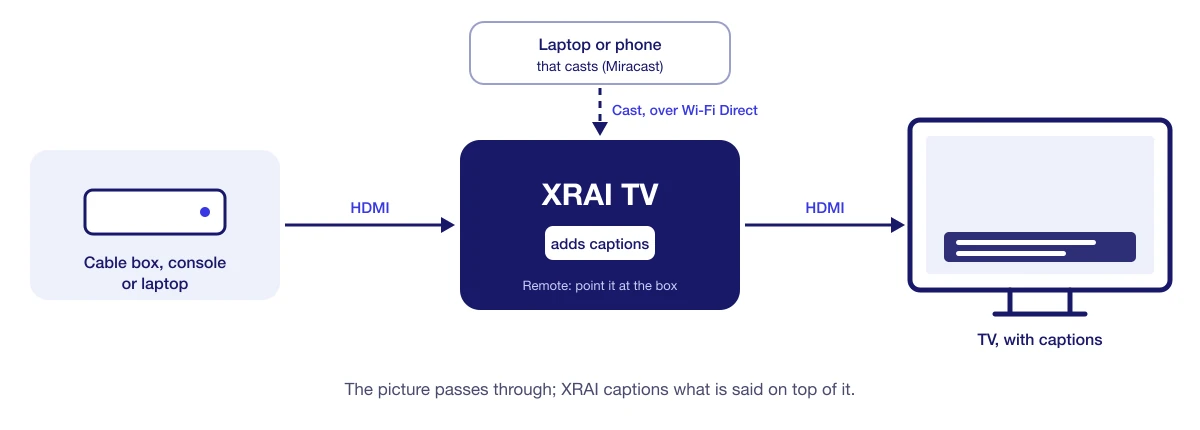
What it shows
- The picture from the source plugged into its HDMI input, a screen cast to it from a laptop or phone, or a camera. The green button on the remote switches between them, and the red button between sound sources.
- Captions of what is being said, on a caption bar you can move, resize and recolour from the remote.
Every day
XRAI TV starts straight into XRAI when it is switched on. Press Play/Pause on the remote to start captions and Stop to stop them, and Menu to open or close Settings. See The XRAI TV remote for every button.
The box's ID and pairing code
The header of the Settings popup shows the box's four-character ID, such as BD7A, and a six-character pairing code that changes regularly. The box appears as XRAI TV followed by its ID when you cast to it and in lists of streams.
Settings can be changed from the remote, or from the XRAI app on a phone paired with the box using that pairing code.
Help
If something isn't working, see XRAI TV problems and fixes, or email support@xrai.glass with the box's ID from the top of Settings.