
This page is for the optician, optometrist or ophthalmologist of someone who wears XRAI AR2 captioning glasses. It explains how the glasses show text, where the text appears and how far away it is focused, and what XRAI needs to make prescription inserts for them.
How the AR2 show captions
The XRAI AR2 look and wear like ordinary glasses. They caption what people around the wearer say, using the XRAI app on their phone. Each lens has a display, so both eyes see the same green text, and the wearer sees the world through the lenses as usual, with the text over it.
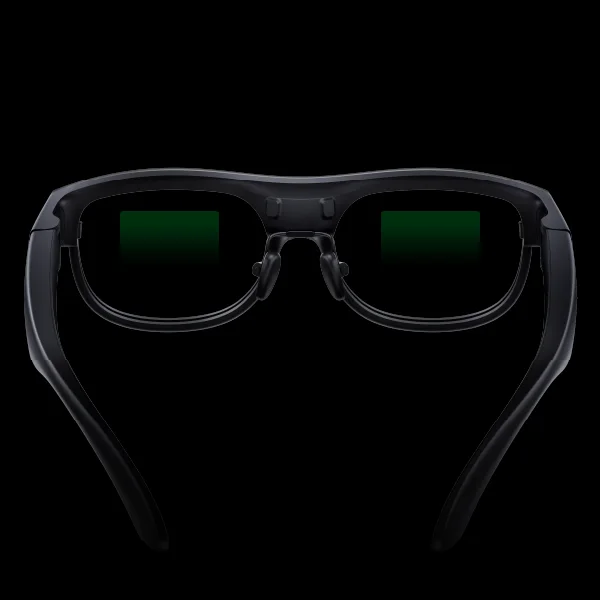
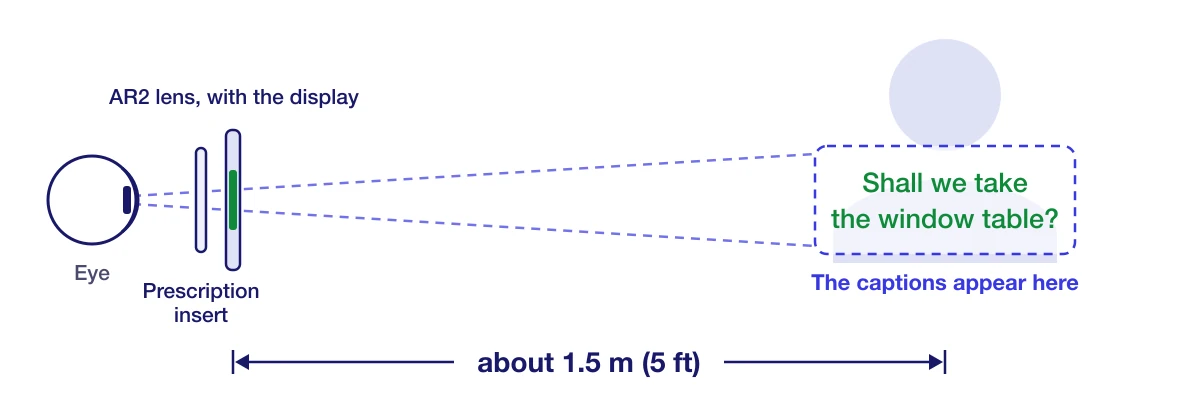
The text isn't focused on the lens. The optics form it as a virtual image about 1.5 m (5 ft) in front of the wearer, about as far away as a person they are talking to. The distance is fixed: it doesn't change with the text size, brightness or position.
| Display | One in each lens · green text · 640 × 480 · 23° field of view · up to 2,500 nits, in five brightness levels · anti-glare coating |
|---|---|
| Text focus | About 1.5 m (5 ft), fixed |
| Frame | Lens 52 × 40 mm · bridge 20 mm · frame width 140 mm · temples 145 mm · 49 g |
Where the text appears
The captions appear within the display's 23° field of view, a fixed area in front of each eye. In the XRAI app the wearer can place them at the bottom of that area, which is the default, in its centre or at its top. The same settings change the text size (Small, Medium or Large) and the brightness. See Caption size, brightness and position.
What this means for the prescription
To read the captions sharply, the wearer needs clear vision at about 1.5 m. Through a full distance correction, that is an accommodative demand of about 0.67 D.
- Distance prescription. For most wearers, their distance prescription gives sharp captions and a sharp view of the person they are talking to.
- Presbyopia. With little accommodation left, captions seen through a full distance correction can look slightly soft. The inserts are made to the values on the prescription, so you can write one for the AR2, for example a single vision prescription balanced for about 1.5 m.
- Reading glasses. A near-only prescription doesn't suit the AR2: it blurs the captions and the person behind them.
- Contact lenses. Contact lenses that correct distance vision work with the AR2 without inserts.
Single vision or varifocal inserts
XRAI makes prescription inserts that clip in behind the AR2 lenses, in single vision or varifocal (progressive). The wearer chooses one when they order. See Prescription lens inserts.
- Single vision has the same correction across the whole insert, so the captions are equally sharp wherever they are placed. It suits wearers who use the AR2 mainly for conversation.
- Varifocal suits wearers who also need to read close up while wearing the AR2, such as their phone. The captions are seen through whichever part of the insert is in front of them: sharp through the distance zone and the top of the corridor, and blurred through the reading zone.
With varifocal inserts, the wearer should look at the captions with their head up, rather than by lowering their eyes. If the captions look blurred at the bottom position, moving them to the centre or the top places them higher in the view, towards the distance zone.
What to write on the prescription
The wearer enters the prescription in their XRAI account, and XRAI's lens lab makes the inserts from it. XRAI takes these values for each eye:
| Value | Range |
|---|---|
| Sphere (SPH) | −12.00 to +4.00 D, in 0.25 D steps |
| Cylinder (CYL) | −6.00 to +6.00 D, in 0.25 D steps, in minus or plus cylinder form |
| Axis | 1 to 180 |
| Addition (ADD) | +0.75 to +4.00 D, in 0.25 D steps, for varifocal inserts only |
| PD | 27 to 37 mm for each eye |
The order has no box for prism or for a fitting height. If the prescription includes prism, or the varifocals need a particular fitting height, the wearer should contact XRAI support at support@xrai.glass before the inserts are made.
The inserts are made in 1.67 index material, or 1.74 for higher minus powers. Within these ranges, single vision covers every power. Varifocal inserts aren't recommended for spheres from −8.25 to −10.00 D, or for plus prescriptions where the sphere and the addition add up to more than +5.00 D. See Check your prescription for AR2 inserts.
Give a PD for each eye
Please give a monocular PD for each eye: the distance in millimetres from the centre of the bridge of the nose to the centre of each pupil. Write the right and left values separately, as R and L or OD and OS, and use distance PDs rather than near PDs.
The lab centres each insert on the pupil from these values. A single binocular PD, such as 63 mm, can be entered as half for each eye, 31.5 mm, but few faces are symmetrical. The difference matters most with higher powers, astigmatism and varifocals: by Prentice's rule, a 2 mm centration error in a −6.00 D lens induces 1.2 prism dioptres.
Wearers can measure their own PD with the XRAI PD ruler, but a PD measured in your practice is more accurate.
Explaining it to your patient
- The captions look about 1.5 m (5 ft) away, so read them with your distance prescription, not reading glasses.
- With varifocal inserts, look at the captions straight ahead with the head up, and look down through the bottom of the lens only to read something close.
- If the captions look blurred, move them to the centre or the top in the app, and check the inserts have clicked fully into place.
- Text size and brightness can be changed in the app at any time.
Ordering inserts
Inserts are ordered from the XRAI AR2 page. After ordering, the wearer enters the prescription at account.xrai.glass and attaches it to the order: see Enter your prescription for AR2 lenses. Questions about a prescription or an order go to support@xrai.glass.