AI engines: cloud and on-device
Choose where captions are made: by cloud AI engines for the best accuracy, or on your phone for free and offline.
Tap the cloud icon at the bottom of the conversation screen to open AI Engine Priority.
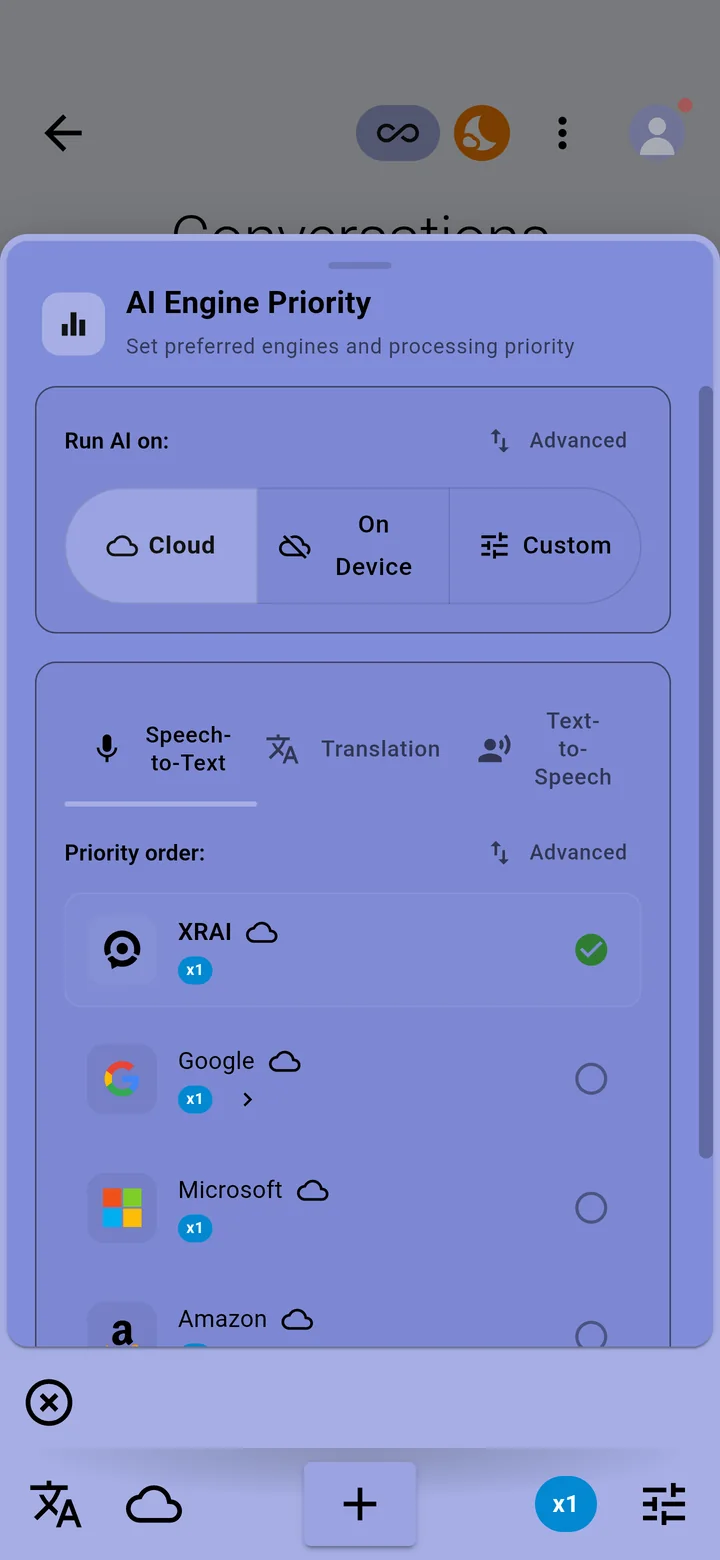
Run AI on
The three buttons choose where the app runs its AI:
- Cloud engines: the most accurate captions and the most languages. They need an internet connection and use Pro minutes.
- On-device engines: captions made on your phone. Free, and they work without a connection. Some languages need a download first.
- Your own order, set in the priority list below.
Priority order
The list shows the engines in the order the app tries them, with the rate each one uses. Tabs above the list set the order for transcription, translation and other tasks. The app uses the first engine that supports your language and plan.
Switch quickly
Hold the cloud icon to switch between online and offline captioning without opening the panel. See Use XRAI offline on iPhone and Android.
On the Ultimate plan the XRAI cloud engine doesn't use Pro minutes.