
When support asks for XRAI Hub logs, collect them on the Mac that runs XRAI Hub. One command lists the days XRAI Hub has logs for, puts the days you choose into a zip file on the Desktop, and shows it in Finder. Nothing is uploaded: you send the file yourself.
Collect the logs
- On the Mac that runs XRAI Hub, open Terminal: press Command-Space, type Terminal and press Return. It is also in Applications → Utilities.
- Copy this command, paste it into Terminal and press Return:
curl -fsSL https://r2.xrai.cloud/tools/hub-logs.sh | bash - Choose the days. The list shows each day XRAI Hub has logs for, newest first, with its weekday and size. Type the numbers of the days you need and press Return:
4for one day,1 3for two,1-3for a run of days, orall. Press Return on its own for the most recent day. If Terminal doesn't understand the answer, it asks again. - Send the file. Finder opens with the zip file selected on the Desktop. Attach it to an email to support@xrai.glass, and say what went wrong and roughly when.
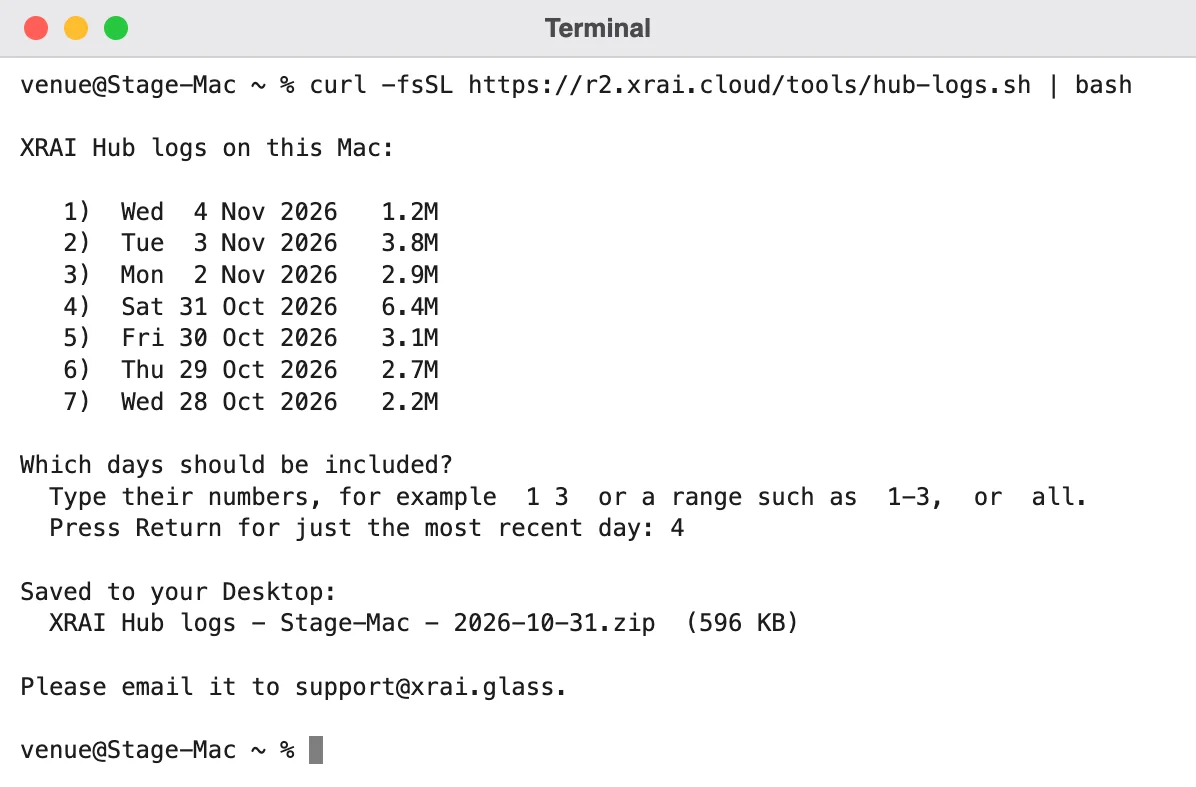
The file is named after the Mac and the days, for example XRAI Hub logs - Stage-Mac - 2026-10-31.zip. Most email services don't accept files larger than 20 MB. If the file is larger, Terminal says so: share it with a link from iCloud Drive, Google Drive or WeTransfer instead.
The command downloads a short script from XRAI and runs it. To read the script first, open r2.xrai.cloud/tools/hub-logs.sh.
What the file contains
- The XRAI Hub log for each day you chose.
- The log of XRAI Hub's updater.
- about-this-mac.txt: the macOS version, the Mac model, the XRAI Hub version, and whether XRAI Hub was running.
XRAI Hub keeps about two weeks of logs, one for each day it ran. Collect them soon after a problem, before that day is removed.
If it doesn't work
| Problem | Cause and fix |
|---|---|
| “No XRAI Hub logs were found on this Mac.” | XRAI Hub hasn't run in this user account. Run the command on the Mac that runs XRAI Hub, signed in to the same macOS user account. |
| The day you need isn't listed | XRAI Hub wasn't running that day, or the day is more than about two weeks ago and its log has been removed. |
| “Could not resolve host” | The Mac isn't connected to the internet. Connect it and run the command again. |
| Finder doesn't open | Look on the Desktop for the file named in Terminal. |