
This page is for IT, security and data-protection teams. It explains where audio, captions and translations go when your people use XRAI, what is stored and where, and what changes when XRAI runs on your own network or in your own Azure subscription. XRAI's privacy policy has the full detail, including the services XRAI uses.
The short version
- Conversations are stored on the device, and nowhere else. A conversation's captions and translations are saved in the app's history on the phone, tablet or computer. People can discard a conversation when they stop, delete it later, or turn on Discard conversations so that none are kept.
- Audio isn't recorded unless someone turns recording on. It is captioned on the device, or streamed through the XRAI Hub to a speech service, and isn't kept.
- XRAI's servers don't keep audio, captions or translations, with one exception: stream recordings, which are made only when an event organiser turns recording on.
- In your own Azure, the Hub, the speech services and the logs are all in your subscription, and people sign in with their work accounts. XRAI receives only what it needs to bill you.
- XRAI doesn't use audio, captions or conversations to train AI models.
How captioning works
The XRAI app hears speech through the device's microphone, the microphones in connected glasses, or the sound a computer is playing, and turns it into captions in one of two ways.
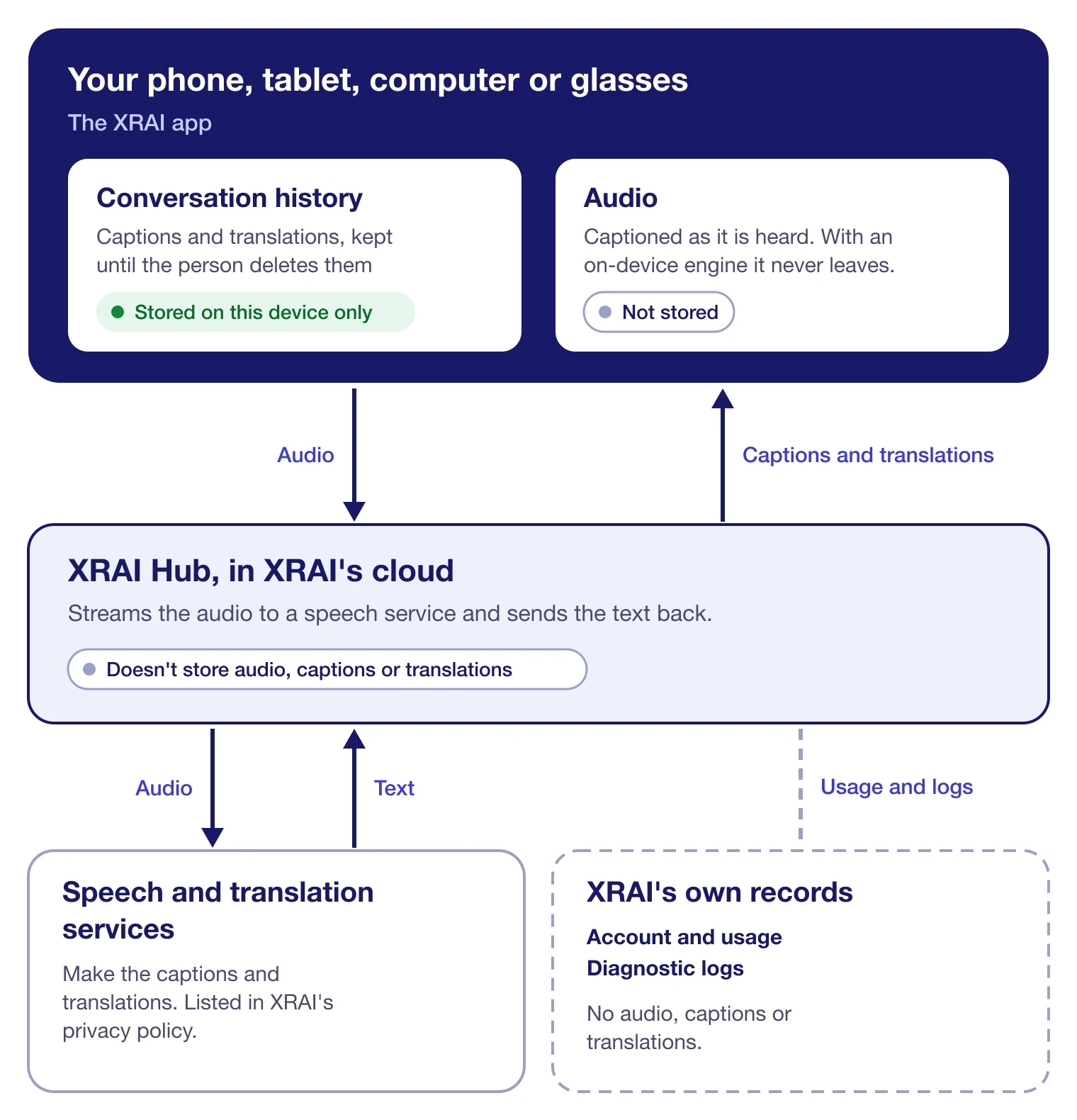
- On the device. On-device engines caption, and on-device models translate, without a network connection. The audio never leaves the device.
- In the cloud. Otherwise the app streams the audio over an encrypted connection to the XRAI Hub, which passes it to a speech service and sends the captions back. Translations travel the same way. The Hub doesn't store the audio, the captions or the translations.
Where the service supports it, cloud captioning runs in a region near the person: Europe, the United States or Japan. A few services run only in the United States; the privacy policy lists them.
If someone chooses Apple's speech recognition on an iPhone, iPad or Mac, Apple recognises the speech on the device where it can. For a language the device can't recognise itself, Apple processes the audio on its own servers.
Text read aloud with a cloud voice is sent to that voice service. Voices on the device keep it on the device.
What is stored on the device
Each conversation's captions and translations are saved in the app's history on the device, with any names people give to speakers. The history isn't uploaded or synced anywhere.
- When someone stops a session, the app asks what to do with the transcript. Discard deletes it. If the app stops in another way, for example when it is closed, the conversation is kept.
- People can delete any conversation at any time: see Rename, share and delete conversations. A deleted conversation can't be recovered.
- Uninstalling the app deletes the history.
- Sharing a transcript sends it only where the person chooses, such as an email or a messaging app.
Keep no conversations
To keep no conversations on a device, turn on Discard conversations: tap your picture, then Settings, and search for it by name. The app then deletes each conversation when its session ends, and no longer offers to keep it.
If XRAI runs in your own Azure, Discard conversations can be turned on for everyone in your organisation: contact support@xrai.glass.
Audio
The app doesn't record audio. A developer setting, Record session audio, saves each session's audio on the device. It is off, and hidden unless developer settings are unlocked.
Securing the device
The history is as secure as the device it is on: anyone who can use the unlocked device, or its user account on a computer, can read it. On devices you manage, require a passcode and turn on storage encryption. Device backups, such as iCloud or Google backups, can include the app's history.
What XRAI's servers keep
| Record | What it holds | How long |
|---|---|---|
| Account | Name, email address, country, mobile number and plan. Passwords are held by the sign-in service, not by XRAI. | While the account exists. Deleted or anonymised within a month of the account being deleted. |
| Usage | For each session: when it started, how long it ran, the engines and languages used, the minutes used, and an approximate location from the IP address. | While the account exists. |
| Diagnostic logs | What the app is doing, with the person's name, email address and device details, so that support can help. They don't include audio, captions, translations or the names people give to speakers. | For a limited period. |
| Glasses pairing | The device's name and local network address while it pairs with a code. | Up to 30 minutes. |
| Stream recordings | Only when an organiser turns recording on: see XRAI Stream and recordings. | 12 months. |
XRAI's servers never keep the audio or the conversation history. If you need diagnostic logs to stay in your organisation, run XRAI in your own Azure, where they go to your own workspace.
XRAI Stream and recordings
XRAI Studio captions what is said at a venue and publishes it through the XRAI Hub to everyone watching, on their phones, on screens and in glasses. Anyone with the stream's link or code can read the captions, without an account. Captions published on a local network can be read by any device on that network.
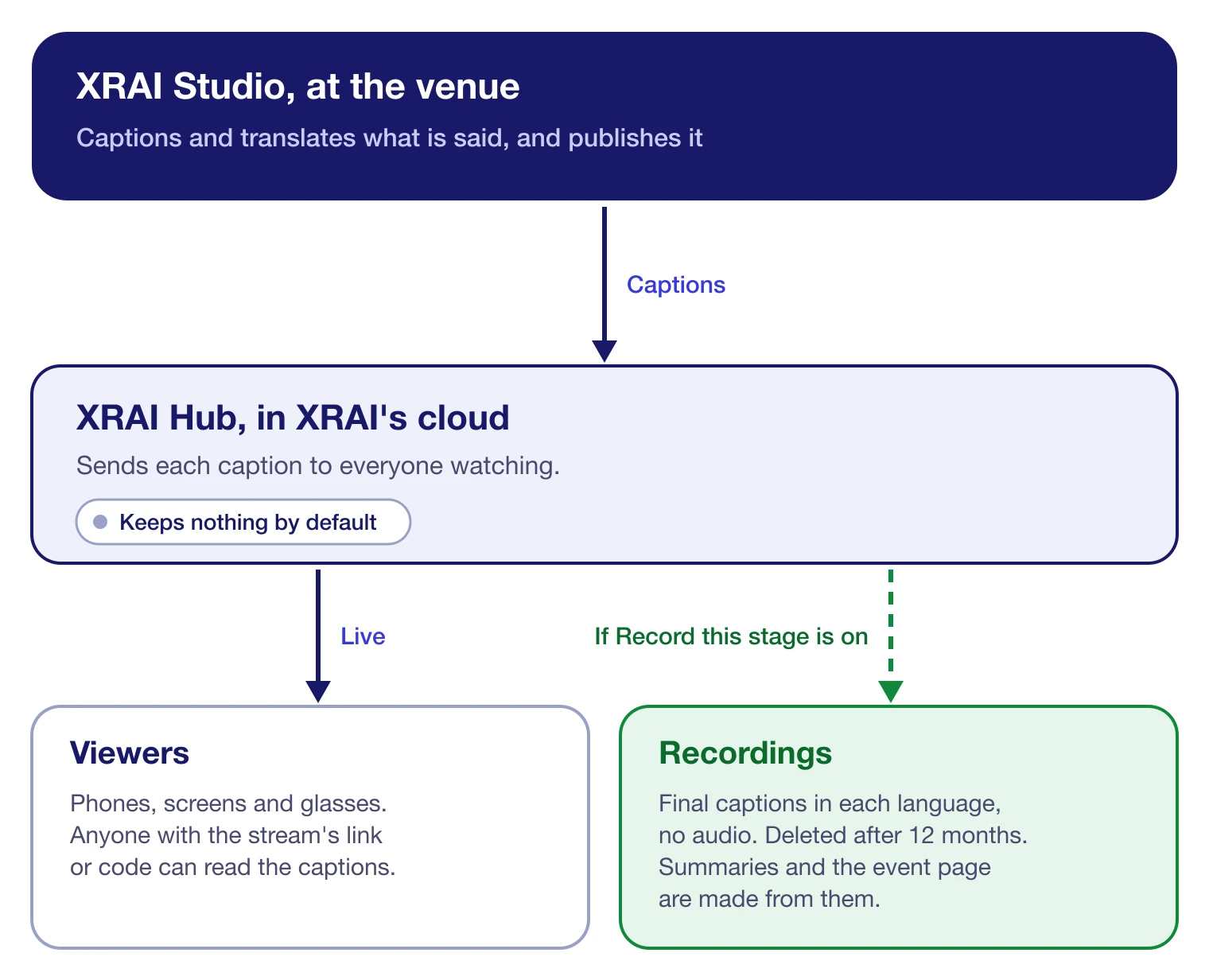
- By default, nothing is kept. The Hub sends each caption on as it arrives.
- Catch up late joiners, off by default, keeps the stream's last 50 captions on XRAI's servers, so that people who join late see them. They are deleted when the setting is turned off.
- Recordings are made only for the stages where the organiser turns on Record this stage. A recording holds the final captions in each language, with their times and speaker labels, and no audio. The organiser and their organisation's administrators can read it in My Account, and XRAI support can see it to help. Each recording is deleted 12 months after its session ends. See Record your event's captions.
- Summaries and key quotes are written by AI from the recordings the organiser chooses. Their captions are sent to the AI service XRAI uses, and the answer is kept with the recordings. See Summaries, key quotes and your own prompts.
- Suggested corrections are made by AI when the organiser asks for them on a recording. Its captions are sent to the same AI service, and the suggestions are kept with the recording. See Correct a transcript with AI suggestions.
- An event page is public once the organiser publishes it, and shows only the sections they choose. See Share your event on a public page.
An XRAI Hub on your own network
An organisation can run the XRAI Hub on a computer on its own network, for example for XRAI for Teams or at a venue. The apps then connect to that Hub instead of XRAI's cloud.
- The Hub captions with engines that run on it, or with the speech and translation services set up on it. It doesn't send audio or captions to XRAI.
- It keeps its own logs on that computer, for about two weeks: see Send XRAI Hub logs to support.
- It saves audio only if audio recording is turned on, and then only on that computer.
- The apps still sign in with XRAI accounts, and still send their diagnostic logs to XRAI.
XRAI in your own Azure
With XRAI Hub from the Azure Marketplace, everything that handles audio and captions runs in your organisation's Azure subscription.
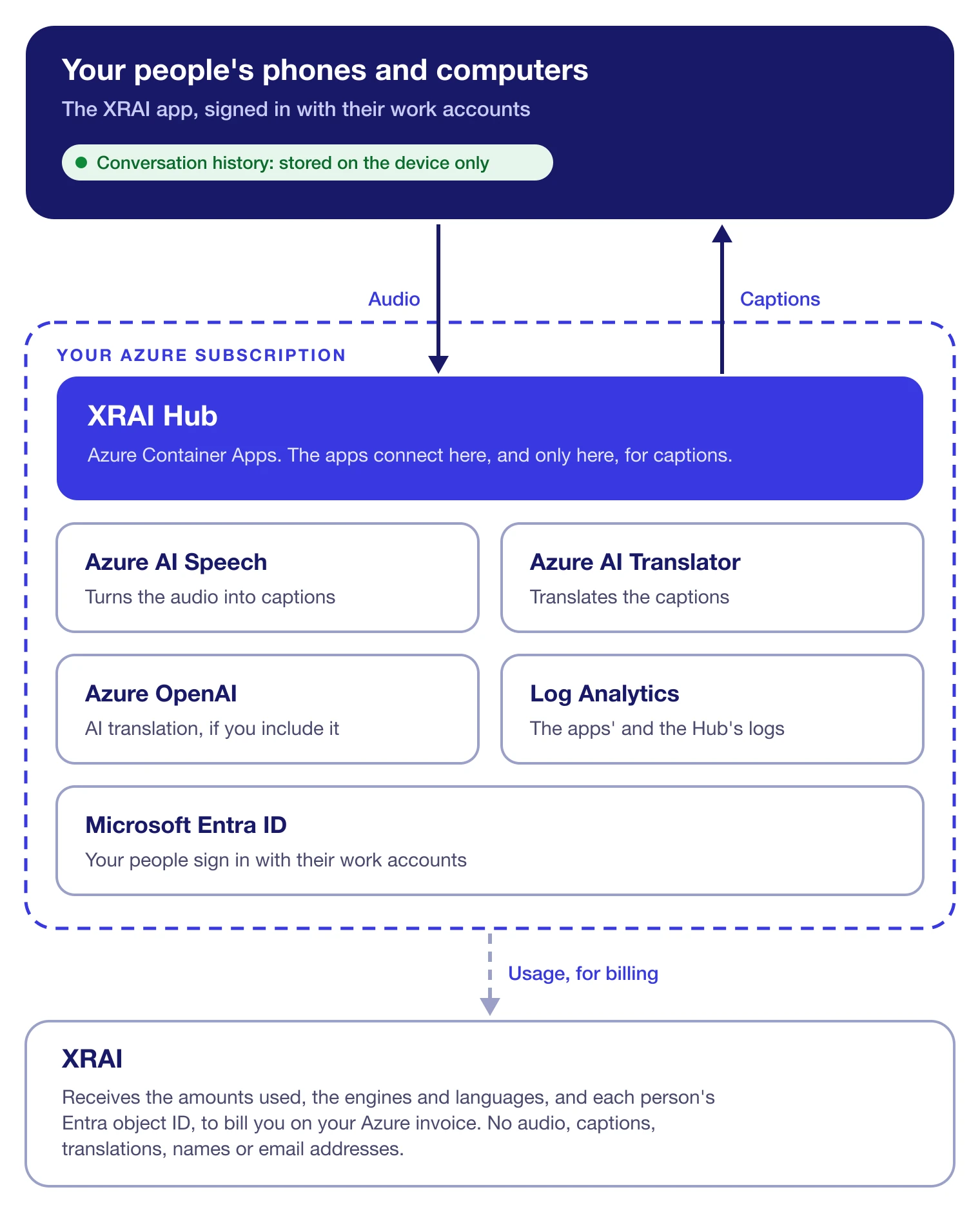
- Captioning and translation use Azure AI Speech, Azure AI Translator and, if you include it, Azure OpenAI, all in your subscription and in the region you choose. On-device engines work as usual.
- The apps connect only to your Hub for captions and translation.
- People sign in with their work accounts, through your Microsoft Entra ID. They don't need an XRAI account.
- Logs from the apps and the Hub go to the Log Analytics workspace in your subscription, which keeps them for 30 days unless you change it.
- XRAI receives only usage, to bill you on your Azure invoice. For each session: the amount of audio captioned, characters translated, AI translation tokens, stream hours and text-to-speech characters, and the engines and languages used. On the Enterprise Hub plan it also receives the person's Entra object ID. The Hub tells XRAI its address, version and region. XRAI receives no audio, captions, translations, names or email addresses.
- The apps still download updates, on-device engines and voices, and glasses firmware from XRAI's servers. These downloads carry no audio, captions or account details.
At a glance
| XRAI's cloud | XRAI Hub on your network | XRAI in your Azure | |
|---|---|---|---|
| The XRAI Hub runs | In XRAI's cloud | On a computer on your network | In your Azure subscription |
| Captioning and translation | XRAI's speech and translation services, or engines on the device | The services set up on your Hub, or engines on the Hub or the device | Azure AI services in your subscription, or engines on the device |
| Conversation history | On the device | On the device | On the device |
| Sign-in | XRAI account | XRAI account | Your Microsoft Entra ID |
| Diagnostic logs | XRAI | XRAI | Your Log Analytics workspace |
| XRAI receives | Account, usage and diagnostic logs | Account and diagnostic logs | Usage, for billing |
More questions
- Who controls the data. When your organisation provides XRAI to its people under XRAI's Business Terms, your organisation is the controller of the audio, captions and other data they generate, and XRAI processes it on your behalf.
- The optional AI assistant. If someone turns on the Hey XRAI assistant with their own AI key, their questions and the recent conversation go straight from the device to that AI provider, under their own agreement with it. The assistant's answers aren't saved.
- Requests about personal data. Email privacy@xrai.glass. People can delete their own account in the app: tap their picture, then Profile, and Delete my account. See Your profile and account.